

Essential Sales Skills Training
Course Aim
Our 2-Day Essential Selling Skills Training Course is the perfect solution for salespeople looking to improve their sales process and close more sales. It’s ideal for those who have had no formal training or are new to the role.
Our course will provide you with techniques and strategies to overcome objections and understand the sales process, allowing you to exceed your targets.
The course is a formally endorsed qualification by the Institute of Sales Management (ISM), which is an industry recognised benchmark for high-quality sales training programmes.
Upon attending this sales skills training, you will receive the “Selling Skills Professional” certificate from the ISM.
The course is also CPD certified, and you will receive a CPD certificate at no extra cost.
You can attend this course along with others from different businesses or if there are a number of you, we can run this course as an in-house version and tweak anything that you need.


Course Objectives
- Learn the difference between an average salesperson and a superstar salesperson
- Learn how to identify the specific needs of your client and how to match these with what you are selling/offering
- Learn how to prepare for sales presentations and calls
- Learn how to overcome objections and excuses in a positive and influential manner
- Learn how to build up credibility and “likeability” from your prospect
- Learn how to elicit your prospects needs and desires and how to read these
- Enhance your questioning and listening skills
- Learn how to use body language and non-verbal communication to your advantage – how to influence your client without them knowing!
- Learn how to understand the motivations of your prospects
- Learn techniques of how to get to that “YES” and close the sale
- How to get your point across without the waffle
- Learn how to build effortless rapport with your prospects
- Learn how to make that positive first impression
- Learn how to generate business over the telephone
Target Audience & Who Will Benefit
- Field salespeople
- Business to business salespeople
- Salespeople who have had no formal training on the subject before
- Salespeople who need a refresher and need to get “back to basics” and refocus their time and effort
- New salespeople
- Client relationship managers
- Account managers
- Business development managers
- Commercial managers



Course Overview
Day 1
Introduction & Objectives
How To Be A Superstar Sales Person
- Discover the differences between average salespeople and outstanding salespeople.
- Understand what makes an outstanding salesperson and how to adjust to changes in the selling landscape due to the pandemic and the current economic situation.
Understanding The Sales Process
- Learn the different stages of the sales cycle and what influences buying decisions.
- Understand how to process decisions in the prospect’s brain and how to influence their choices.
Learning How To Understand Your Prospect’s Needs
- Step into your client’s shoes to understand their challenges, priorities, and perspective so you can respond in a way that truly resonates with them.
- Learn how to adapt your approach based on what your client wants and position yourself, your company, and your product in a way that aligns with their priorities, challenges, and expectations.
The Techniques & Communication Skills Of Superstar Sales People
- Learn how to ask the right questions at the right time to guide conversations, uncover real needs, and build stronger connections.
- Understand the different selling techniques and models, consultative and collaborative selling models.
- Develop your ability to listen attentively, read body language and buying signals, and build rapport with your prospect.
Day 2
Recap & The Day Ahead
How To Overcome Objections & Excuses
- Discover how to turn negative responses into positive situations, including overcoming price objections and stalling.
How To Get To The Close & Ask For The Business
- Learn strategies for identifying buying signals.
- Understand when the right time is to close and how to close more prospects comfortably.
How To Make Effective Sales Presentations & Sales Calls
- Learn how to plan out and structure sales presentations, sales calls, and talks.
- Develop the ability to work out what to focus on and what style to deliver the presentation in.
Developing New Business
- Discover how to generate leads and set appointments over the telephone, via LinkedIn and other sales platforms.
- Learn essential inbound and outbound sales techniques, including opening calls with impact, getting past gatekeepers and building a strong personal brand.
- Develop your skills in handling common objections such as “I don’t have time” and “We don’t have the budget” through persuasive verbal and written responses.
Close & Actions
- Summarise what you’ve learned and plan your actions for applying your new skills and strategies to your sales approach.
Testimonials & Reviews From Previous Attendees

Feedback From The Last 72 Sales Professionals Who Attended This Course
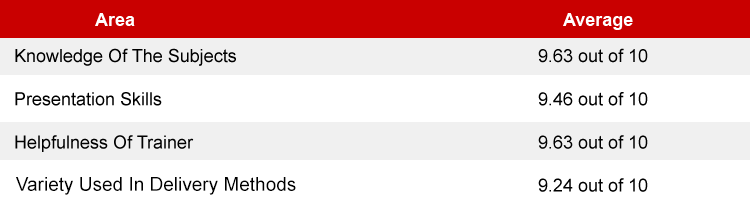
The course was delivered in an informal way that made all who attended feel very comfortable. The trainer was highly attentive and instilled confidence in the delegates by her “human” approach. I never felt awkward asking questions. I thoroughly enjoyed the course and hoping to go on another one soon.

Your trainer was excellent. He was engaging throughout the whole day and his knowledge really showed. He was able to help and give advice on dealing with different situations in my company specifically which made it very personal and I felt as though he was very passionate about delivering the course and helping us get the most out of it.

The course and our trainer were brilliant. She made it accessible, interesting, and challenging from the start. I hadn’t expected to get so much out of the course. I feel completely equipped to go back to the office and go about selling in a reinvigorated and well educated fashion, so thank you!

Experienced Sales Trainers
Our trainers have had years of experience both as salespeople and as trainers.
Meet a few of them to give you a feel of what they’re all about.

Sales Trainer and Consultant
Mark has over 25 years of coaching experience and focuses on B2B sales. He has enhanced the performance of teams at Peugeot, Citroen, and Jaguar Land Rover. His targeted training drives significant business growth.

Sales Trainer and Consultant
Anne-Louise, with her ILM Level 7 in Business Coaching & Mentoring, has enhanced the sales capabilities of Tesco, Morrisons, and Ernst & Young over 20 years in the field. Her strategic training empowers sales professionals.

Sales Trainer and Consultant
Bronwyn, with a decade in sales training, combines her New Insights Certified Coach expertise across finance to marketing, impacting firms like the Ministry of Commerce and CMR UK Ltd. Her dynamic approach inspires sales excellence.
Training Locations
Central London

60 Pentonville Road
Angel Kings Cross, London
N1 9LA
Manchester Airport

Ringway Rd, Airport
Manchester
M90 3NS
Heathrow

Eastern Perimeter Road
Hatton Cross, London
TW6 2SQ
Bristol

Filton Road
Hambrook, Bristol
BS16 1QX
Coventry

Paradise Way
Walsgrave on Sowe
CV2 2ST
In-House Course

We Can Deliver This
Course At Your Location
For Your Managers

Pricing
The course fees are £495 + vat.
ISM & CPD Certified
The Essential Selling Skills Training Course is a formally endorsed qualification by the ISM and is also CPD Certified. Upon attending the course, you will receive the “Selling Skills Professional” certificate from the ISM and a CPD certificate.
Start & Finish Times
Start: 9.30am
Finish: 4.30 – 5.00pm
Included Within The Registration Fee:
- Course manual
- Course materials
- Buffet lunch
- Servings of tea and coffee throughout the day
- ISM “Selling Skills Professional” certificate & CPD certificate
- 3 months access to 1000+ courses via our Skillshub platform
- Unlimited email and telephone support from your trainer after the course
Click BOOK NOW to secure your place. It only takes a moment, with payment by card, invoice or bank transfer. Once you’re booked, we’ll send a confirmation email. Simple, flexible and hassle-free.


Course Methods & On-Going Support
We believe that training should be practical and fun. That’s why this course is delivered in an engaging way with lots of participation. All delegates receive a pre-course questionnaire to complete so we can gauge the experience and roles of those attending so we can cater for your specific needs and requirements.
After we have delivered this course, we do not just shake hands and take your money. We like to offer you some ongoing support.
Included within the cost are the following unique support options that are available to you.

Selling Skills Training FAQ
How can I improve my sales skills?
Will this course improve my sales communication skills?
Does this course cater for all products and services?
What is the structure of this sales skills training?
Related Courses
Our most popular venues are London, Manchester, and Coventry.
Want to know more?
Please speak to one of our team or use
our online form to make an enquiry
